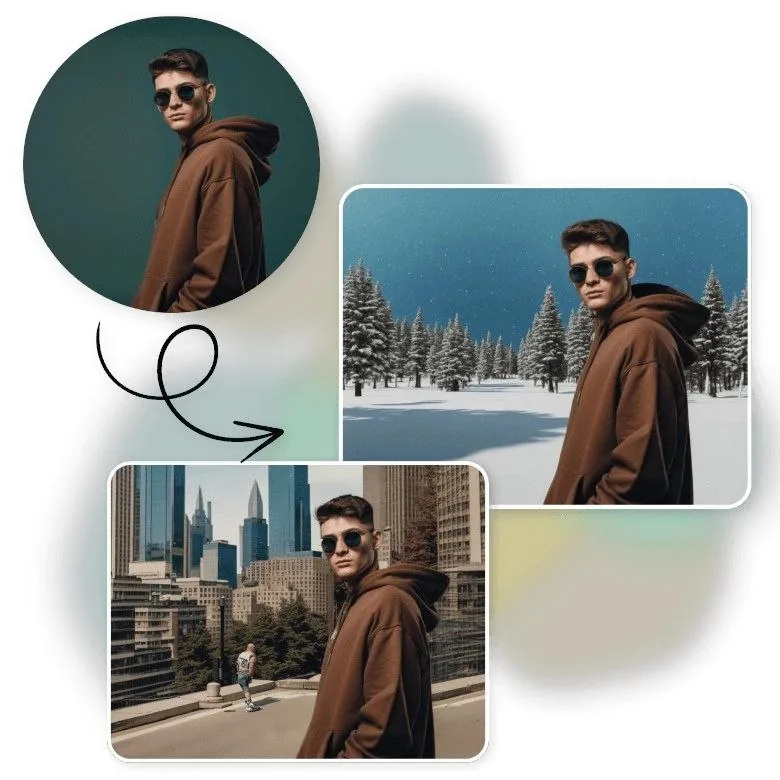
Best AI Background Generators in 2026: Top Tools Compared
Quick Summary
Looking for the best AI background generator in 2026? ModernPhotoTools is the top free all-rounder for professional output and batch processing. DALL-E 3 and Midjourney lead for creative and artistic prompts. Adobe Firefly is the go-to for Creative Cloud users. Canva wins for beginners needing fast results. The right choice depends on your use case, budget, and required output quality — this guide breaks all of that down clearly.
Try Our Free AI Background Generator Tool
Experience professional-quality background generation in seconds with ModernPhotoTools. No signup required.
Generate AI Background Now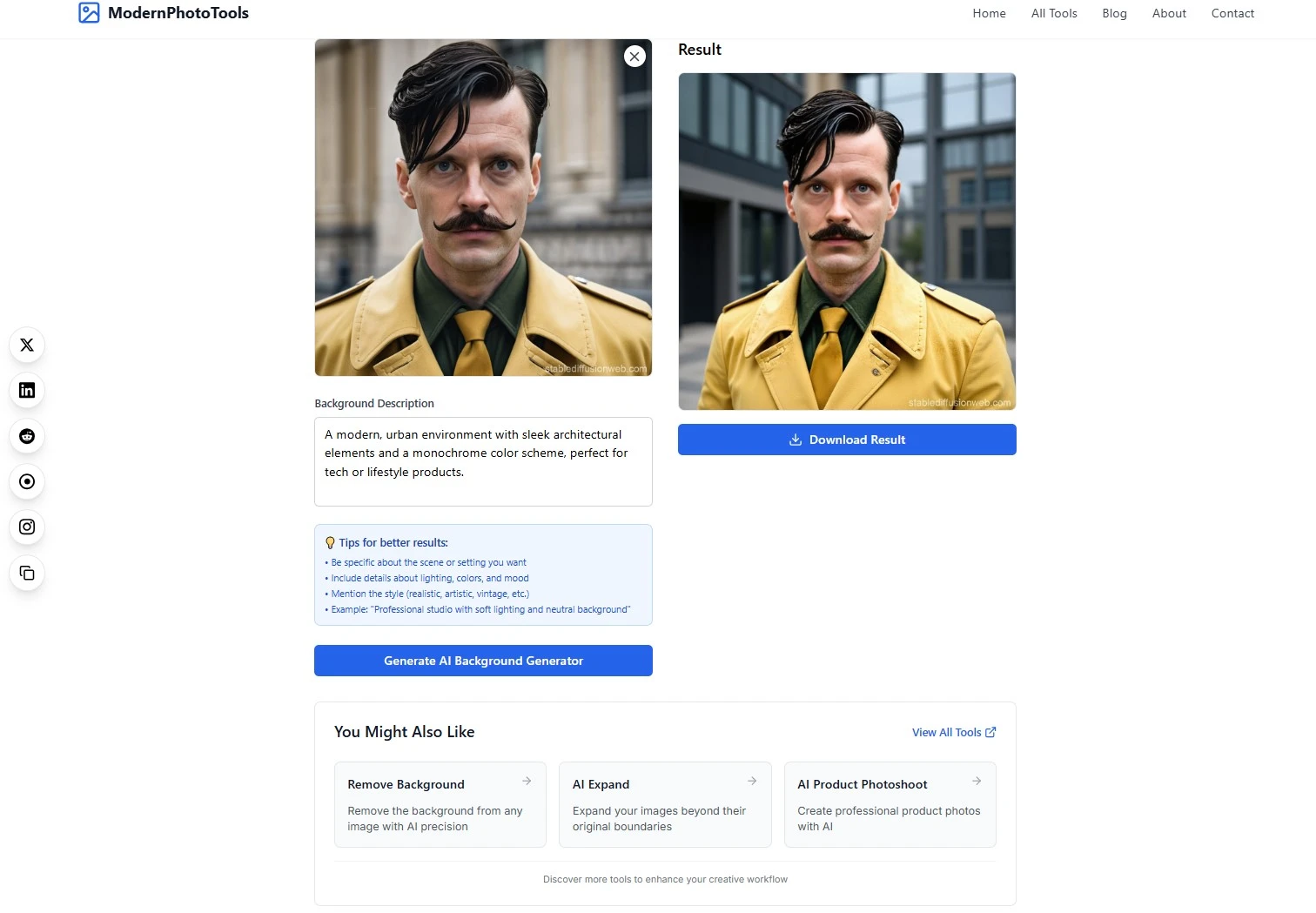
Table of Contents
- Quick Summary
- Full Comparison Table: Best AI Background Generators in 2026
- Tool-by-Tool Breakdown
- 1. ModernPhotoTools — Best Overall (Free)
- 2. DALL-E 3 — Best for Detailed Creative Prompts
- 3. Midjourney — Best for Artistic Quality
- 4. Adobe Firefly — Best for Adobe Ecosystem Users
- 5. Canva — Best for Beginners
- 6. Other Notable Tools
- Who Each Tool Suits
- How to Choose the Right Tool
- Future of AI Background Generation
- FAQ
Full Comparison Table: Best AI Background Generators in 2026
Before diving into individual reviews, here is a direct side-by-side comparison of the top AI background generators based on output quality, ease of use, pricing, and core features.
| Tool | Best For | Key Features | Pricing | Output Quality | Ease of Use |
| ModernPhotoTools AI Background Generator | Professional photographers and designers needing precision and customization | Advanced style control, seamless background blending, batch processing, custom prompt library | Totally Free | 5/5 | 5/5 |
| DALL-E 3 | Creative professionals needing highly detailed custom backgrounds | Exceptional detail, creative interpretation, style variety, AI prompt generator via ChatGPT | $20/month (ChatGPT Plus) | 5/5 | 4/5 |
| Midjourney | Artists and designers seeking aesthetic backgrounds | Artistic quality, style consistency, community features, parameter control | $10–$60/month | 4.8/5 | 3.5/5 |
| Adobe Firefly | Adobe Creative Cloud users | Generative fill, background extension, Photoshop integration, commercially licensed training data | $9.99/month | 4.7/5 | 4.5/5 |
| Canva | Beginners and marketing teams needing quick results | Template library, intuitive interface, multi-format export, AI photo enhancer | Free tier; Pro at $12.99/month | 4/5 | 5/5 |
| Fotor | Casual users needing simple background solutions | One-click remove background AI, template library, basic editing | Free tier; Pro at $8.99/month | 3.8/5 | 4.8/5 |
| Picsart | Social media content creators | Mobile-friendly, quick generation, social media templates, image upscaler | Free tier; Premium from $9/month | 3.7/5 | 4.7/5 |
| Artbreeder | Experimental artists seeking unique backgrounds | Image blending, collaborative creation, style mixing | Free tier with Premium options | 4.2/5 | 3.5/5 |
| Videoleap | Video content creators | Video background replacement, motion tracking, effects library | Free tier; Pro at $7.99/month | 4/5 | 4.2/5 |
| Deep Dream Generator | Abstract and artistic background creation | Surreal effects, pattern enhancement, style transfer | Free tier with Premium options | 4.3/5 | 3.8/5 |
Tool-by-Tool Breakdown
1. ModernPhotoTools AI Background Generator — Best Overall (Free)
ModernPhotoTools AI Background Generator is the most balanced option in 2026 for anyone who needs professional output without the cost. It combines cutting-edge AI image generation with granular controls for lighting, texture, depth, and color — all in an interface accessible enough for beginners and powerful enough for professionals.
Unlike most AI background tools that force a trade-off between quality and ease, ModernPhotoTools delivers on both axes. It also handles background replacement in existing images, making it a true all-in-one AI photo editing solution.
Key Features
Pros
- Completely free with no feature restrictions
- Photorealistic output quality matching paid competitors
- Handles both generation and replacement of backgrounds
- Batch processing for high-volume workflows
- Regular updates with new capabilities
Cons
- Some industry-specific templates still in development
- No Discord community for inspiration like Midjourney
Pricing
- Unlimited background generation
- Full access to style controls
- Batch processing
- Multi-format export
Totally Free
Try ModernPhotoTools Free
2. DALL-E 3 — Best for Detailed Creative Prompts
DALL-E 3, integrated into ChatGPT Plus, is the strongest AI image generator for turning complex text descriptions into detailed, coherent backgrounds. Its built-in prompt generator capabilities — via conversational refinement through ChatGPT — make it uniquely accessible for users who struggle to write effective prompts from scratch.
Where DALL-E 3 excels is in literal prompt interpretation and intricate detail. When you need a background that matches a specific, complex scene description, no tool in 2026 interprets it more accurately.

Key Features
Pros
- Best-in-class prompt interpretation accuracy
- ChatGPT integration simplifies prompt writing
- Excellent style variety from one tool
- Included in ChatGPT Plus — no extra subscription
Cons
- No background replacement for existing photos
- Limited fine-grained parameter control vs. Midjourney
- Requires ChatGPT Plus subscription ($20/month)
Pricing
- Full DALL-E 3 access included
- Unlimited image generation
- Conversational prompt refinement
- HD resolution output
ChatGPT Plus — $20/month
3. Midjourney — Best for Artistic Quality
Midjourney remains the top AI background generator for aesthetic excellence in 2026. Where other tools aim for accurate or photorealistic results, Midjourney produces backgrounds with a distinctive artistic coherence that makes creative and brand-forward content stand out.
The learning curve is real — it operates through Discord, and mastering its parameter system takes time. But for designers, game developers, and creative marketers who need distinctive, high-quality visual backgrounds, there is no better tool available at this price point.

Key Features
Pros
- Highest aesthetic output quality for artistic backgrounds
- Strong community for learning and inspiration
- Excellent for concept art, game development, and creative campaigns
- High-resolution output on higher plans
Cons
- Discord-based interface is unfamiliar to most users
- Steep learning curve to use parameters effectively
- No background replacement for existing photos
- Private mode requires the Pro plan ($60/month)
Pricing
- 3.3 hours GPU time/month
- Standard generation speed
- Community access
Basic - $10/month
- 15 hours GPU time/month
- Faster generation
- Higher resolution options
Standard - $30/month
- 30 hours GPU time/month
- Maximum speed
- Stealth/private mode
- Priority support
Pro - $60/month
4. Adobe Firefly — Best for Adobe Ecosystem Users
Adobe Firefly is the strongest choice in 2026 for anyone already working within the Adobe Creative Cloud ecosystem. Its generative fill and background extension features work directly inside Photoshop — meaning there is no file export/import loop, no context switching, and no quality loss from format conversion.
Firefly is also the safest AI background generator for commercial use. It is trained exclusively on licensed content and public domain imagery, which removes the copyright ambiguity that affects tools like Midjourney and DALL-E 3 for commercial projects.

Key Features
Pros
- Seamless Photoshop integration eliminates workflow friction
- Commercially safe output — ideal for agency and brand work
- Handles both background generation and replacement
- Strong for realistic, subtle background modifications
Cons
- Only valuable if you are already using Adobe Creative Cloud
- Weaker than Midjourney for highly stylized artistic outputs
- Requires an Adobe subscription — adds cost if not already subscribed
Pricing
- Standalone Firefly web access
- 100 generative credits/month
- Background generation and fill
Firefly — $9.99/month
- Full Photoshop + Firefly integration
- Generative Fill inside Photoshop
- All Creative Cloud apps included
Creative Cloud — From $54.99/month
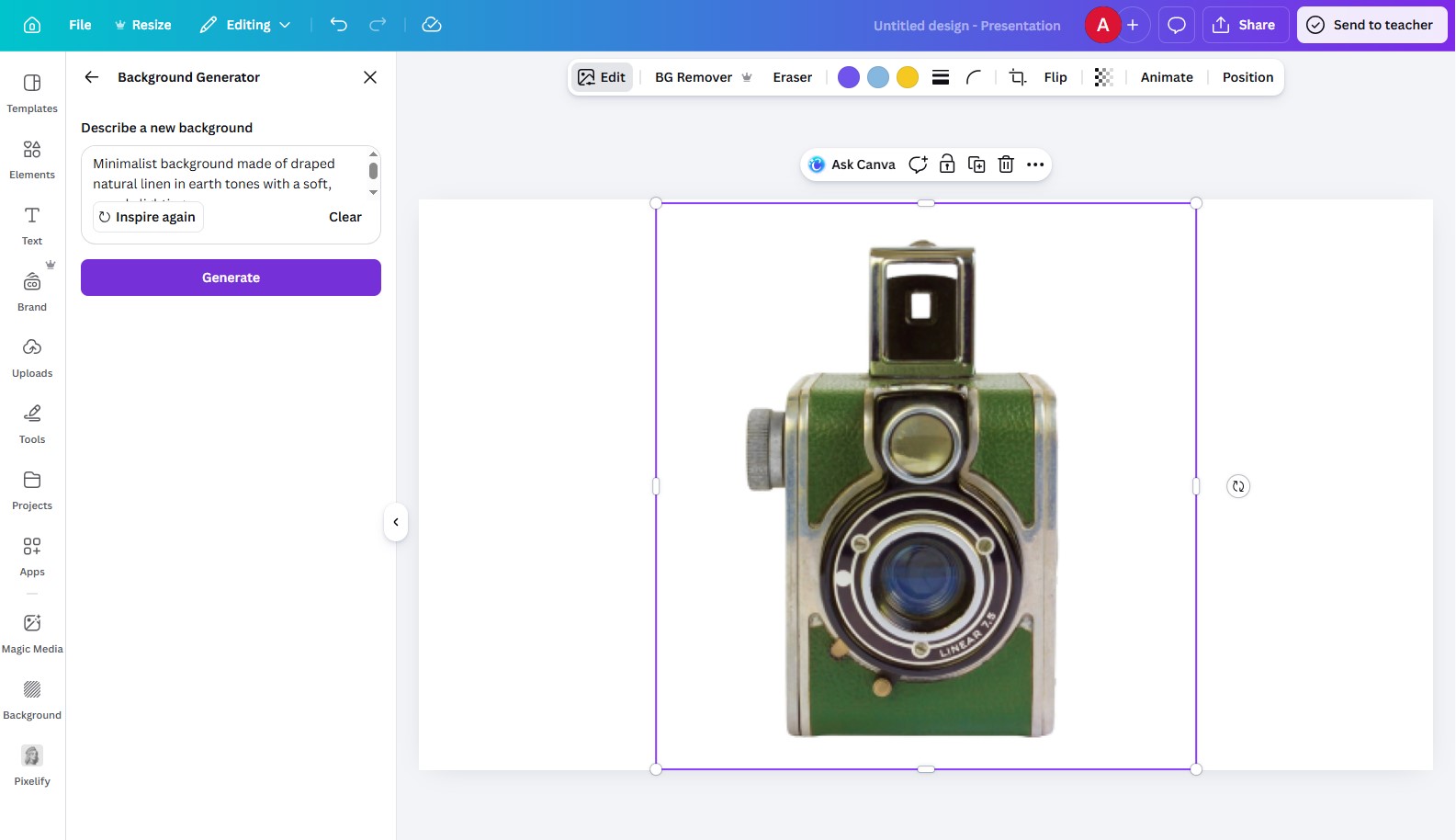
5. Canva — Best for Beginners and Marketing Teams
Canva's AI background generation capabilities make it the most accessible entry point in 2026 for content creators and marketing teams with no design background. Its template library, combined with AI-powered background generation and a built-in remove background AI tool, covers most content creation needs in a single drag-and-drop environment.
Output quality is lower than ModernPhotoTools or DALL-E 3, but for social media graphics, presentations, and marketing collateral, Canva's speed and simplicity are a genuine advantage over more complex tools.
Pros
- Zero learning curve — usable by anyone immediately
- All-in-one design tool with AI background generation built in
- Strong free tier covers most beginner needs
- Remove Background AI included at no extra cost
- Multi-format export for every major platform
Cons
- Lower output quality than professional-grade tools
- Limited customization for fine-tuned background control
- No batch processing for high-volume workflows
- AI generation outputs can feel generic without heavy customization
Pricing
- Basic AI background generation
- Template library access
- Standard export formats
Free
- Full AI generation features
- Remove Background AI (unlimited)
- Premium templates and assets
- Brand kit and team features
Pro — $12.99/month
6. Other Notable AI Background Generators
Fotor — Simplest Remove Background AI
Fotor's one-click remove background AI and template library make it a strong option for casual users. It lacks the depth of top-tier tools but delivers usable results with minimal effort.
Picsart — Best Mobile Option
Picsart is the leading mobile AI background generator in 2026. Its built-in image upscaler and social media templates make it practical for creators who work primarily from their phone.
Artbreeder — Best for Experimental Blending
Artbreeder's image blending approach produces genuinely unique backgrounds by merging multiple source images. Output is unpredictable but often distinctive — suited to experimental artists, not production pipelines.
Videoleap — Best for Video Backgrounds
Videoleap fills the video background gap that still-image tools leave. It replaces video backgrounds without green screens using motion tracking — the most complete tool for video content creators in this space.
Deep Dream Generator — Best for Abstract Art
Deep Dream Generator creates surreal, pattern-enhanced backgrounds using neural style transfer. The output style is immediately recognizable and suited to niche artistic projects rather than commercial applications.

Who Each Tool Suits
| User Type | Recommended Tool | Why |
| Professional photographer | ModernPhotoTools | Photorealistic quality, precise control, batch processing, free |
| E-commerce business | ModernPhotoTools | Batch processing, consistent output across product catalogs, free |
| Creative / concept artist | Midjourney | Unmatched artistic quality and style consistency |
| Content creator (text-heavy prompts) | DALL-E 3 | Best prompt accuracy; ChatGPT integration simplifies prompt writing |
| Adobe Creative Cloud user | Adobe Firefly | Native Photoshop integration; commercially licensed output |
| Beginner / marketing team | Canva | Zero learning curve; all-in-one design environment |
| Social media creator (mobile) | Picsart | Mobile-first design; image upscaler and templates built in |
| Video content creator | Videoleap | Only tool with proper video background replacement and motion tracking |
| Abstract / experimental artist | Deep Dream Generator or Artbreeder | Surreal and blended outputs not achievable with standard AI image generators |
| Real estate professional | Adobe Firefly | Subtle, believable enhancements for virtual staging and view improvement |
How to Choose the Right AI Background Generator
Five questions that narrow the decision quickly:
What output quality do you need?
For client-facing professional work or premium brand campaigns, use ModernPhotoTools, DALL-E 3, or Midjourney. For internal use or social media, Canva and Fotor are sufficient.
Do you need generation, replacement, or both?
DALL-E 3 and Midjourney only generate new backgrounds from prompts. ModernPhotoTools and Adobe Firefly handle both generation from prompts and replacement within existing photos. For full workflow coverage, choose the latter two.
How large is your volume?
For high-volume workflows — product catalogs, campaign assets at scale — batch processing is mandatory. ModernPhotoTools is the only free tool with proper batch capabilities. Canva supports batch export in Pro.
What existing tools do you use?
If your workflow is Adobe-centric, Adobe Firefly's native integration saves significant time despite the subscription cost. For standalone use, ModernPhotoTools requires no ecosystem lock-in and no cost.
Is commercial safety a concern?
For agency or brand work where copyright liability is a factor, Adobe Firefly is the only tool with fully licensed training data. Other tools offer varying commercial use rights depending on subscription tier — verify before using for client deliverables.
What is your budget?
ModernPhotoTools delivers professional output for free. DALL-E 3 is included in a $20/month ChatGPT Plus subscription. Midjourney's entry-level plan is $10/month. Adobe Firefly starts at $9.99/month as a standalone but is most valuable as part of Creative Cloud at higher cost.
Future of AI Background Generation
The field is moving fast. These are the shifts that will define AI background tools in 2026 and beyond:
Video Background Generation at Scale
Still-image AI background generation is mature. The next frontier is video — replacing backgrounds across frames with temporal consistency and no green screen required. Videoleap is currently the only tool with meaningful capabilities here, but established AI image generators like ModernPhotoTools and Adobe Firefly are developing video capabilities. By 2026, video background replacement will be a standard feature.

3D and Immersive Background Generation
The boundary between 2D background generation and 3D environment creation is eroding. Depth-aware AI models are beginning to produce navigable 3D spaces from text prompts — relevant for VR, AR, and interactive media. This will expand the definition of what an AI image generator can produce within the next two years.
Hyper-Personalization
AI tools are developing the ability to analyze brand assets and generate backgrounds that are automatically coherent with a brand's visual identity — without manual style specification. This is the direction that tools like ModernPhotoTools are advancing with their custom prompt library and style controls.
Ethical and Sustainable AI
Pressure is increasing on AI background generators to disclose training data sources, compensate artists whose work influenced model training, and reduce the energy cost of generation. Adobe Firefly is currently the industry standard on the ethics front. Others will follow as regulatory and market pressure increases.
Outlook: The tools that will lead in 2026 are those that combine high-quality output with transparent ethics, seamless workflow integration, and video capability. The gap between free and paid tools will narrow further — ModernPhotoTools is the clearest indicator of that trajectory today.
FAQ — AI Background Generators
What is the best free AI background generator in 2026?
ModernPhotoTools AI Background Generator is the top free option in 2026. It offers unlimited generation, advanced style controls, batch processing, and professional-quality output at no cost — outperforming several paid competitors on pure output quality.
Can AI background generators replace traditional photo editing software?
For background-specific tasks, yes. AI background generators complete in seconds what previously took hours in Photoshop. For full photo retouching, complex compositing, or detailed object manipulation, traditional software remains relevant — though tools like Adobe Firefly and ModernPhotoTools are narrowing that gap significantly.
Do I need background generation, replacement, or both?
Generation creates entirely new backgrounds from text prompts — DALL-E 3 and Midjourney are the strongest options for this. Replacement swaps the background of an existing photo — ModernPhotoTools and Adobe Firefly handle this. ModernPhotoTools and Adobe Firefly do both effectively. If you only need one, match the tool to the task; if you need both, those two are the clear choices.
Are AI-generated backgrounds safe to use commercially?
Adobe Firefly is trained on licensed content and is the most commercially safe option. DALL-E 3 and Midjourney both allow commercial use on paid plans but have specific terms that should be reviewed. Canva's AI-generated content is covered under their content license for commercial use. Always verify the specific terms of the tool and subscription tier you are using before applying AI-generated backgrounds to commercial deliverables.
What is the difference between an AI image generator and an AI background generator?
An AI image generator (like DALL-E 3 or Midjourney) creates full images from text prompts — subjects, backgrounds, and all elements together. An AI background generator is purpose-built to either create backgrounds that work with an existing subject or to replace the background of a photo while keeping the subject intact. Tools like ModernPhotoTools combine both capabilities: they generate backgrounds from prompts and replace backgrounds in existing images.
Final Recommendation
Best Overall: ModernPhotoTools
Free, professional-grade output, batch processing, handles generation and replacement. The most complete AI background tool in 2026 for any user type.
Best for Artistic Output: Midjourney
For designers, game developers, and creative campaigns where aesthetic quality takes priority over photorealism and speed.
Best for Beginners: Canva
The most accessible starting point for content creators and marketing teams with no design background or time to learn complex tools.
AI background generation has fundamentally changed what is achievable for photographers, designers, marketers, and content creators — removing cost and time barriers that previously made professional visual content a bottleneck. The tools listed here represent the best of what is available in 2026. The direction of travel is clear: higher quality, broader capability, lower cost, and faster generation. Start with the tool that fits your current workflow, and expect the landscape to shift further within the next 12 months.